# Create an app user
### **What is an app user?**
The vcard is a versatile tool that allows users to access essential contact information without needing to log into the application. However, by **logging in with an app user**, a series of additional functionalities are unlocked that enrich the user experience. These exclusive features include:
- Access to the **User Profile**
- The [Contact Scanning](https://help.tictapcards.com/books/smart-contact-scanner/page/scan-cards) function developed with artificial intelligence
- The **FAQ section**, which provides quick and helpful answers to common queries
To log into a vcard, an invitation must first be sent to the corresponding user, and the user must then activate their account. To do this, follow these steps:
### **Create an app user for a vcard**
Tasks to be performed by the team administrator:
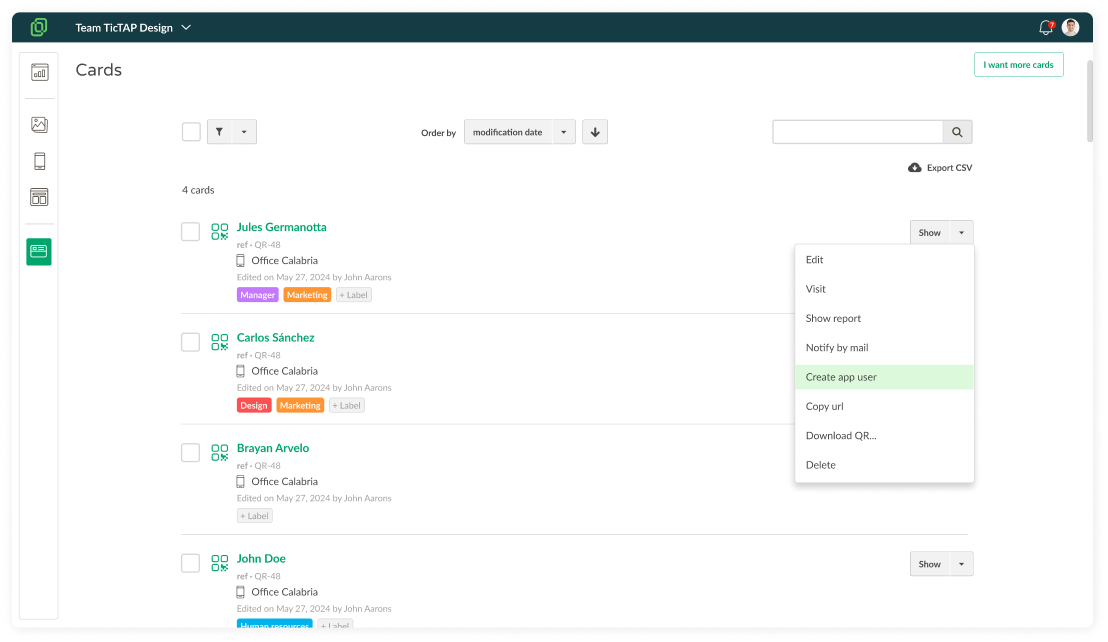
1. **Access the list of cards** of your employees
2. Select the card you want, and select **"Create app user"**.
The recipient will receive an email with the steps to follow for activating the vcard.
[](https://help.tictapcards.com/uploads/images/gallery/2024-07/YzSmoTt3nbNK2WLu-cards-1.png)